Showing posts with label website. Show all posts

Make Free Websites - Unlimited Space & Bandwidth

Make Free Websites - Unlimited Space & Bandwidth

Everyone, now a days, is making websites to earn online money by providing their services. Some of them buy their own web hosting and some use free hosting servers. Its hard to find any tool to create free website online BUT Microsoft Office Live Small Business allows users to create free website. You do not need to have a credit card to sign up or pay them any fee, you don’t event need to purchase a domain name.

If were really looking for an easy way to make free websites online so this post will surely make your day because Now you can create free websites with MS Office Live Small Business without any credit card or paypal account. The most useful benefit is that all your files will be hosted on Microsoft servers which are believed to be faster than other hosting servers. You can also share and store documents using Microsoft’s servers.
Build Your Website + Choose a Domain + Add Email + Store & share docs 

All the tools and sources will be given to you to design your website with an instruction guide which will help you step-by-step. You will also be able to use Microsoft Site Designer to design your website. You do not need to have any professional or designing skills to create a professional looking website because you get Microsoft Site Designer to help you all the time. You can select a template for your website from a large database of templates. You can customize logo, color combination etc and also can integrate Paypal in that freely created website.
You will get a free website address like www.infotech.web.officelive.com but you can use your custom domain also like www.infotech.com but for custom domain, you will have to pay from your pocket.
    
Features of Microsoft Office Live Small Business
v     Completely Free Website Hosting
v     Unlimited Space and Unlimited Bandwidth (when Microsoft said, simply TRUST)
v     Free Email Accounts
v     Free Templates
v     Easy Customization of Logos and Color Combination
v     Paypal Integration
v     Free Online Support
v     Store or Share any document Online at Microsoft’s Servers
v     Site Traffic Statistics and Domain redirection

           The service is currently available only in U.S.A , U.K. , India, Japan, Mexico so if you are in any of these locations but you can create a free website using U.S.A. zip code if you are out of these locations, Just to create you free website with unlimited hosting and bandwidth by Microsoft. If you are not from these locations or don’t want to use U.S.A location, just wait for some time, Microsoft will surely launch this free service in your country also.


Create a Free Blog with Blogger?

There are several websites giving you a free platform to start your blog and share your thoughts with the world. Blogger.com and WordPress.com are world’s most commonly used blog services. There are many limitations creating a free blog at WordPress.com because you can not install plug-ins, you can not modify or edit WordPress template according to your requirement, You can not monetize your wordpress.com free hosted blog. But in Blogger, you can install widgets, you can edit templates according to your requirements and you can earn some money from your Blogger.com free blog as well. So I will suggest you to go with Blogger. Creating a Blog at Blogger.com is as easy as 123. Just follow these simple steps to create a free Blog using Blogger.com Service.
.
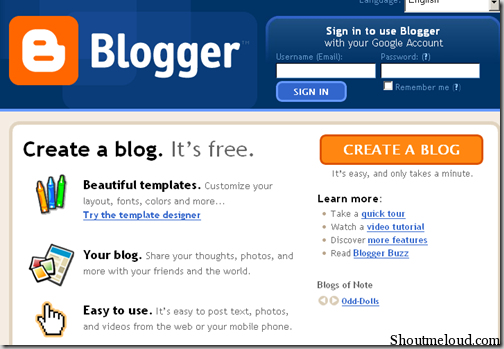
  • You Will get a form, Just Fill that form and after filling click on Continue
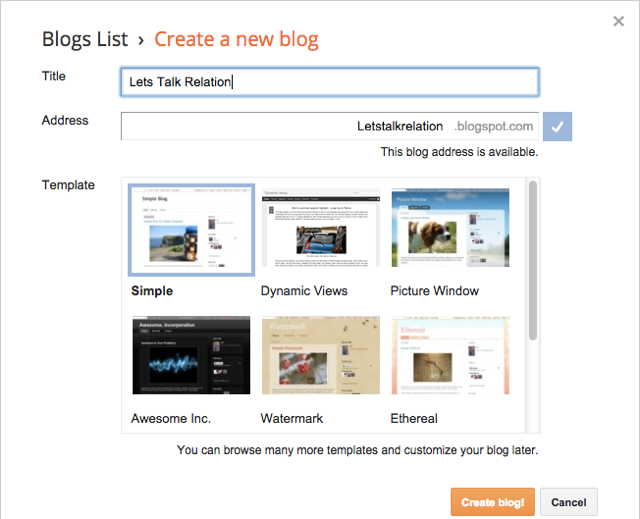
  • Now, Give Your Blog Title and a Blog Address (check availability) and Click on Continue (see below shown picture for assistance)
  • Just Complete Step1, Step2, Step 3 and Step4 as shown in above picture.
  • Now, Its Time to Select a Design for your Blog. Select any Design by clicking on that design and after selecting any design click on Continue
  • Congratulation!!! You Just Have Created Your Blog. Now Just Click on Start Blogging and you are on you way.
  • That’s it!!!
If you face any difficulty creating a free blog using Blogger.com then feel free to discuss with us using Below comments form.

5 Things to Know When Starting a Blog

A blog is an abbreviated word for weblog. It is a web-based journal in which people can publish their thoughts and opinions on the Internet. Blogging is an interesting and rewarding career path nowadays. You can use free or paid host serving to begin a blog. You just need to have a flair for being able to read and write well. To start a blog is easy but to maintain a blog is the most difficult part. Follow the tips below to make every effort you put into your blog worthwhile. Determine the answers to the 5 questions below:

What is your use?

Decide if you want to focus on company branding, or perhaps differentiating your services by writing about your specific expertise or perhaps carrying out market research. Read other blogs and sites to gain some useful knowledge and to avoid future problems.

Who would you want to read it?

The best types of business blogs are specific in nature. Determine who you are writing for, then you should be able to write things that are going to interest them. Write about topics that interest you. They might be unpopular in the beginning but if you know what you are writing you will grab the attention of the reader and provide endless fresh ideas too. Competition in blogging is tough so be prepared that if your topic does not intrigue the reader, he will move away from it. You can keep your blog open to any Internet visitor or you can just keep it open for your friends and family to be able to read it. Most blog sites offer the service of password-protect so that your published posts are open to only those who you approve of.

Where to run your blog?

Decide whether you want to have run your blog on your own website or run it from a separate domain. If it complements and is related to what you have on your website then integrate it with your website. On the other hand, if you want to take a different stance in your blog which does not coincide with your main website, then you can use a different domain.

How much time will you spend on it?

Blogging requires time. You will keep on writing posts but even maintain the quality of what you produce as well. Plan how much time you are willing to dedicate to your blog and how much you can easily afford to give.

What do you want your blog to achieve?

What is your target? What do you want the return on investment to be? Measure the results and decide on the criteria and target you wish to achieve.

10 Reasons Why Blogging Sucks

Blogging has recently gained much popularity in the internet world. Apart from the many benefits it has, there are many disadvantages of blogging. What is your purpose for blogging? Why do you blog? Is it for yourself, or for other people? Blogging means writing about things that matter to you and telling people what you think about those subjects. Voicing your opinion is important. Since the real purpose of blogging is lost today, blogging does not appeal to many.Other reasons are:
  • Shortage of ideas: A blogger has to be innovative and write new posts. Lack of ideas and running out of topics leads to boredom for the reader and the writer. Because of this many blogs lose their originality.
  • Earning potential: Blogging is not a very lucrative profession for some. Only few bloggers can actually recover their costs as a blogger.
  • Spinning articles: Many bloggers try to rephrase and rewrite the same topic over and over again. It is necessary to either write something interesting or go home.
  • Regular posting: Blogging has to be regular and continuous. Bloggers need to update their blog at least a couple of times a week.
  • Unique looking blog: Your blog may resemble the thousands of other blogs on the Internet. What differentiates it from the rest? Many blogs lack a unique appearance, thus it does not stand out among the rest.
  • Time consuming: Blogging can become addictive and eat up too much of your time. It can even get you into trouble in the real world. This is why blogging is not such a good idea after all.
  • Addiction: Blogging can turn into an addiction. It can lure you into the world of social disinteraction and keep you aloof from physical and emotional contact with others.
  • Public display of your feelings and emotions: Today, blogging is a very public display of diary keeping where individuals and companies type their innermost thoughts on public pages.
  • Lack of facts and evidence: Many blogs also lack facts and evidence. They are based on purely personal opinions and thoughts, hence not backed up by factual evidence and support.

Top 10 Do Follow Social Bookmark Sites

Social Bookmarking sites are sites that allow its users to post their favorite sites. They can do this by using tags or keywords to categorize and organize them. Other users can take these bookmarks and add them to their own collection or share them with more users. Purpose for such sites is, Social bookmarking links is done for social traffic. If you want to advertise your blog or promote a product, you will need to use a social media bookmarking campaign. Below are a list of sites that are very useful and effective social bookmarking websites:

1. Digg.com

This is a social bookmarking and social networking site. Anyone can submit a Digg (site), and then anyone can comment on those Diggs.  This website primarily focuses on technology related items.

2. Mixx.com

Mixx has a mix of all sorts of content ranging from videos to news to stories.

3. Furl.com

With this particular social bookmarking website, users can save copies of any Web page, search within their own personal archive of Web pages, and share what they find. Furl is used by many to create their own personal shopping lists, real estate directories, job searches, student research papers, etc.

4. Clipmarks.com

This social bookmarking site allows you to clip the best parts of web pages. You can capture the pieces you want from a paragraph, image or video without having to bookmark the entire page.

5. Reddit.com

This is another social bookmarking Web site that operates like Furl. You can register with a username and password, and then submit and share your bookmarks. Users are encouraged to vote on the links and stories.

6. del.icio.us

This is a popular and widely used social bookmarking site.

7. StumbleUpon.com

In this social bookmarking website you can take advantage of a vast network of dedicated Web searchers.

8. Newsvine.com

This social bookmarking site enables you to read stories from media organizations like Associated Press and individual contributors from all around the world. Stories should be fresh and popular. Anyone can contribute.

9. Diigo.com

This is another new favorite Web tools. Diigo can be used to save your favorite Web bookmarks, put sticky notes on websites, highlight stuff you like, comment, and much more.

10. Propeller.com

Another popular bookmarking website is Propeller. It works similar to other social bookmarking sites such as Digg or del.icio.us. Users find stories, submit them, and other Propeller users can vote and comment on those stories.

Blogger VS Self-hosted Wordpress

WordPress and Blogger, both are the top blogging platforms having several advantages and disadvantages. Blogger is a free blogging platform by Google and WordPress is also a free platform but here we will compare blogger with Self hosted wordpress as several bloggers at many webmasters forums said that Blogger/blogspot can not beat self hosted wordpress. Now, Let me tell you that, I am using both platforms since November 2007 and this review is on my personal experience and i hope this will bring the trustworthy and fair information. Below are advantages and disadvantages chart of wordpress and blogger.

Advantages of Self Hosted WordPress

  • You can have your self hosted wordpress paying few dollars per month from any shared hosting company
  • Your Blog, Your Rules. You can write whatever you want.
  • You can manage your blog database.
  • You can easily import-export your wordpress blog.
  • Large number of wordpress themes
  • WordPress Plugins to enhance user experience and add additional functions in your blog.
  • Categories and Tags system makes wordpress more useful
  • You can ask programmers/developers to develop a plugin for a particular function.
  • Galleries feature to upload single or bulk images and put a organized gallery in a post.
  • Each uploaded image can be edited or removed from wordpress dashboard.
  • Users can get full size picture by clicking on thumbnail and we can monetize or control that page too where full size pictures are displayed.
  • We can add authors, subscribers, contributors and administrators
  • Read More Summary
  • Its SEO friendly
  • We can add unlimited static pages.
  • We can change permalinks structure.
  • Feed of every category and tag.
  • We can make a post private or can protect by using password function.
  • Akismet spam protection
  • Comments system is user friendly and we can use page numbering by using some plugins too.

    Disadvantages of Self Hosted WordPress

    • Shared Hosting Accounts are not reputable for wordpress blogs as when you use few plugins and having a thousand visitor per day, Your account will be suspended.
    • If you are having more traffic, you need to buy VPS which may cost more than your expectations and its not easy to manage VPS or Dedicated server. You need to hire system administrator or concerned expert to do such things.
    • Bandwidth Problems
    • Holes: This is lack of security
    • Always have to use Cache plugins which everyone dont know how to manage.
    • Some times its not easy to import a wordpress blog due to import file size limit .
    • WordPress’s dashboard interface is not much user friendly.
    • Not everyone knows, what kind of plugins a blog must have.
    • Widget management is also not much easy – little complex.

      Advantages of Blogger/blogspot

      • Its Free!
      • Its by Google! which has reliable servers and offer reliable services than shared hosting accounts.
      • Its easy to create blogs with blogger and you can create as many* blogs as you want within 1 blogger account (* limit is 100 blogs per account).
      • Unlimited Bandwidth
      • You can easily publish posts as it has user friendly dashboard (at least easier than wordpress)
      • We can find thousands of free blogger templates
      • We can easily upload new themes
      • We can easily add gadgets
      • We can easily monetize a Blogger blog by easily integrating Google adsense in our blog.
      • We can upload free images up to 1 GB (we can also increase space to another 1GB by tricks)
      • Its also SEO friendly and Google Loves Blogger blogs.
      • You can even start an Adult blog with blogger
      • Built-in dashboard stats
      • Spam protection and enhanced comments system
      • We can easily add custom domain
      • We can import-export blogger blog easily.
      • We can add static pages (upto 10)
      • We can make a blog private by restricting access to invited Google account holders only.
      • We can add upto 100 blog authors which can write for our blog
      • We can add or restrict admin privileges of an author.

        Disdvantages of Blogger/blogspot

        • We can not add additional functions .
        • We only can upload images/pictures and can not other files like .zip, .exe etc
        • Some times, Blogger’s spam detector marks your blog as SPAM forgetfully and several say blogs are even deleted without any notification and you loss your data and contents too if you dont have any backup of your blog.
        • We can not manage uploaded images within our blogger account. We have to visit our picasa web albums account for managing our uploaded images and its not easier to find uploaded images in Picasa Web Albums.
        • Poor Help desk.
        • Blogger’s Comment system is not much user friendly
        • We only can import other blogger blogs and can not import wordpress etc blogs.
        • Blogger labels can not be indexed in search engines as default robots file (which blogger generates for every blogspot blog) restricts search engines to index labels. This may cause your blog SEO however, Google uses blog archives to Index your blog but what about other search engines ?
        • Sometimes, Your blogger blog posts are not indexed due to some bugs and Google indexes those posts after several days or even months. This happened with me several times.
        • Professional bloggers see blogspot blogs with weird eyes

        These are advantages and disadvantages of Blogger and Self hosted wordpress blog.  Normally, Professional bloggers go with self hosted wordpress and some also trust blogger too as i did not had any issue with blogger blog having more than 10k visitors a day since last 20+ months. Let me know your thoughts !

        Host your Template Images in Blogger (Unlimited Bandwitdh)

        A year back, I used photobucket to host my template images.. but, the problem with photobucket and many other free image hosts is their bandwidth limitations. Once, you exceed a specific amount of bandwidth, your images won't show, instead.. an irritating ' bandwidth exceeded' image shows. Next, after that I tried to create.. like a new photobucket account per each template.. but, that also exceeded in a matter a couple of weeks.
        Not only me, my other blogger template designers are also struggling to find a reliable, free image host with unmetered bandwidth.

        I tried to upload the images to blogger and copy the image url from the status bar and use it in templates.. but it didn't worked. But, recently I came to know that we can actually host the images( large) in blogger and hotlink,use them in templates, forums,etc.

        Here is the trick..

        As usual, create a new post in blogger and upload your template images to that post... but don't publish it... keep it as a draft.
        Once you completed uploading all the images, Open each image in a new window.

        open image in new window


        Once, the image is loaded in the new window, what I previously did was to copy the image location from the status bar and paste/hotlink it in templates. But, it didn't worked!

        Copying image url from status bar

        Now, the trick is, many people don't know that the url which we copy from the status bar is not exactly the direct link to that image file... that's why we can't hotlink to that image.

        So, what we have to do to hotlink to that image is Right Click on the image and ' Copy Image location'. (for firefox users). For Internet explorer users, Right click on the image and go to Properties and then copy the image url from there.

        right click and copy image location

        Example:
        For the above picture, status bar shows...

        https://blogger.googleusercontent.com/img/b/R29vZ2xl/AVvXsEh4Tpqb97DkvIP0TuWa_3-GyFP7yb3D7OHJWXe300yXdKYPm66MmIRpPmg3-1iyTWP7wNVhOP69cPhQ9Xwtdos_OKVW-W2QAbW6yibLpgt_IQyIg5F9JRVIy-Szgqi0yx2-AUwOqWlpGGhK/-h/2008-05-28_124414.jpg


        which don't work.

        And the Real image url we get after right clicking and copying image location is..


        https://blogger.googleusercontent.com/img/b/R29vZ2xl/AVvXsEh4Tpqb97DkvIP0TuWa_3-GyFP7yb3D7OHJWXe300yXdKYPm66MmIRpPmg3-1iyTWP7wNVhOP69cPhQ9Xwtdos_OKVW-W2QAbW6yibLpgt_IQyIg5F9JRVIy-Szgqi0yx2-AUwOqWlpGGhK/s1600/2008-05-28_124414.jpg


        Which works and we can do whatever we want.. with unlimited bandwidth :D
        Hope this trick will be useful to many people who are searching for unlimited bandwidth image hosts.