My Site Bandwidth Blasted!!

Today morning, I got an email from my hosting company that my account was temporarily suspended due to excessive usage of Bandwidth.
Daily thousands of people are downloading our template copies.So, it's understandable. I got my account back and I can't afford to get it suspended again.
I edited each template again and changed the image links (presently, images hosted in 5 Photobucket accounts).

I'm providing the template image files in the download file.So, if you really like a template, please feel free to spend 10 minutes on uploading the image files to your account and change the image links in the template.. so, the problem will never repeat again.

How to do that?? (Tutorial)

QUICK METHOD:

1.Download a Fresh Copy of the template and replace your template code from

<head>

<b:include data='blog' name='all-head-content'/>

<title><data:blog.pageTitle/></title>

<b:skin><![CDATA[/*


to


]]></b:skin>

</head>

How to Host your Template Images in Blogger (Unlimited Bandwitdh) ?

If you are a regular reader of Blogger Tricks, you probably know that previously I had many problems hosting my template images. A year back, I used photobucket to host my template images.. but, the problem with photobucket and many other free image hosts is their bandwidth limitations. Once, you exceed a specific amount of bandwidth, your images won't show, instead.. an irritating ' bandwidth exceeded' image shows. Next, after that I tried to create.. like a new photobucket account per each template.. but, that also exceeded in a matter a couple of weeks.
Not only me, my other blogger template designers are also struggling to find a reliable, free image host with unmetered bandwidth.

I tried to upload the images to blogger and copy the image url from the status bar and use it in templates.. but it didn't worked. But, recently I came to know that we can actually host the images( large) in blogger and hotlink,use them in templates, forums,etc.

Here is the trick..

As usual, create a new post in blogger and upload your template images to that post... but don't publish it... keep it as a draft.
Once you completed uploading all the images, Open each image in a new window.

open image in new window


Once, the image is loaded in the new window, what I previously did was to copy the image location from the status bar and paste/hotlink it in templates. But, it didn't worked!

Copying image url from status bar

Now, the trick is, many people don't know that the url which we copy from the status bar is not exactly the direct link to that image file... that's why we can't hotlink to that image.

So, what we have to do to hotlink to that image is Right Click on the image and ' Copy Image location'. (for firefox users). For Internet explorer users, Right click on the image and go to Properties and then copy the image url from there.

right click and copy image location

Example:
For the above picture, status bar shows...

https://blogger.googleusercontent.com/img/b/R29vZ2xl/AVvXsEh4Tpqb97DkvIP0TuWa_3-GyFP7yb3D7OHJWXe300yXdKYPm66MmIRpPmg3-1iyTWP7wNVhOP69cPhQ9Xwtdos_OKVW-W2QAbW6yibLpgt_IQyIg5F9JRVIy-Szgqi0yx2-AUwOqWlpGGhK/-h/2008-05-28_124414.jpg


which don't work.

And the Real image url we get after right clicking and copying image location is..


https://blogger.googleusercontent.com/img/b/R29vZ2xl/AVvXsEh4Tpqb97DkvIP0TuWa_3-GyFP7yb3D7OHJWXe300yXdKYPm66MmIRpPmg3-1iyTWP7wNVhOP69cPhQ9Xwtdos_OKVW-W2QAbW6yibLpgt_IQyIg5F9JRVIy-Szgqi0yx2-AUwOqWlpGGhK/s1600/2008-05-28_124414.jpg


Which works and we can do whatever we want.. with unlimited bandwidth :D
Hope this trick will be useful to many people who are searching for unlimited bandwidth image hosts.

How to track your blog visitors?

As a new blogger(webmaster),it is always interesting to know how many people are visiting your blog/site,pageviews,where they are coming from,which sites are referring,how many are coming via Search Engines(google,yahoo,etc) and what they are typing in the search engines to visit your site.
These stastistics are very handy interms of improving your blog and it is for FREEsmile

If you search the google,you will find hundreds of sites which will track the visitors of your blog/site.But,some sites will provide more information about your visitors than the others.
So,how to do this?
Here are the best tracking sources interms of the feautures they provide.

Note:One thing is common for all the tracking sites.First you need to register,and provide the necessary information about your blog/website.Next,they will give you a html code and you have to embed it in your blog.
How to do that in blogger?
1.Sign in to your blogger dashboard.
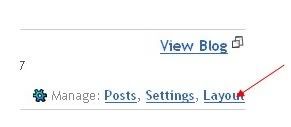
2.Click on the 'layout' link next to your blog name.
3.Click on the "Add a Page element"
4.Select "html/javascript" and past the code they provide and SAVE THE CHANGES.

From then,your blog will be tracked and you can check your blog stats from time to time after logging in to your registrate's website.

So,here are the good ones:-


Sitemeter.com:This one is one of the Most Popular tracking source.This is as simple as 123. Just create an account,copy the code from your account and paste it in your blog as suggested above.
You have also the option to keep your blog stats PRIVATE.
They will give you the stats on how many pageviews(hits) per day,unique visitors,geolocation of the visitors,how many users online,and much more...As it is simple(not much animation),you site will load as fast as it is before.Stats are updated hourly.
You can setup a Free Account
here

histats.com
Histats.com:Unlike the Sitemeter which is very simple, this site will have very cool and animated counters.animated countersanimated countersanimated countersanimated counters

Tracking is updated every 5 minutes.I personally using this site for my blogs.Like Sitemeter,
this is also have the option to keep your site stats PRIVATE.
They will provide Animated graphs about your site visitors and fully animative.
You can register with them here

statcounter
Statcounter.com:Same here!As in the name,it is a stats counter.It is fast,free,and quick loading.
Invisible tracking is available and no ads on your site.All the stats are in real time and super fast.It is not much animated as histats.com.They will provide pageviews,unique vistors,visitors activity,search engine wars,keyword analysis,and many more..
Register a free counter for your blog
here

How to disable right click in blogger (blogspot) or any webpage

This post explains how to disable right click on blogger(blogspot) or any other webpage using a html(javascript) code.
It is so annoying if someone copies(thefts) your blog posts,articles,images and another kind of information owned by you saying that they are the original owners of the content.
But,I think 'disabling right click' is not the right solution for that.
Most people come to your site to read information and very small percentage of people come to your site to steal your work,images,etc.So,most people feel it insulting and I think it's very unprofessional thing to do

If you want to protect your images,my suggestion is to add a Watermark(logo) of your sitename,or your name on the images,pictures,etc.
Note:Using this javascript code,you only disable the right click by warning the visitors that the content is copyrighted.
That's all my personal opinion,However if you despirately want to add this feauture,You can get this code here.


Where to paste it in blogger ?
Sign in to your blogger dashboad>layout>Add a Pageelement>html/javascript(look at the screenshot below)


and paste the below javascript code and Save the changes.
How it works?
If you right click on the webpage,a message will pop up on screen saying "function disabled".If you want to change the message to you own one like "sorry....the work is copyrighted" or something like that,replace the "funtion disabled" text with your own message in the Javascript code.

Remove Blogger Navbar from your blog

Learn how to hide,disable or remove the blogger navbar(navigation bar) from your blog.
First,let us see what blogger navbar is:


Blogger navbar allows users to easily navigate to other random blogs and it also has a feauture to search the blogs ,and mark any blog as spam.
So,now you have a clear idea of what really a blogger navbar is.So, why so many people prefer to just remove the navbar inspite of the feautures it has like search,etc.Many people think that, it spoils the look of the blog,especially if your blog has differnet subtitle layout which looks too obvious to see for a visitor.Well, let me come to the actual point on how to disable or hide your blogger navbar.
Below is the step-by-step procedure on how to do it with photos to make it easy to understand.

1.Sign in to your blogger account and click the layout button next to your blog name
2.Next,click the edit html tab as shown in the below picture.
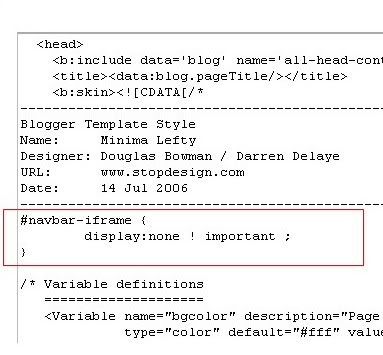
3.Add the below html code as specified in the below picture.

#navbar {
      height: 0px;
      visibility: hidden;
      display: none;
}
4. Save the changes.

Now, you can see your blog without that navbar(this tip can only hides the navbar,it doesn't completely delete it).If you want the navbar to appear again,just remove that code and save the changes.
If you have any doubts,regarding this post,don't hesitate to ask.You can ask your doubts via comments to this post.

How to Add Blogger Share Button to Custom Blogger Templates


Recently, Blogger released their new Share Buttons feature which makes it easier for your Blog visitors to bookmark, tweet, fshare, email ,etc your post.

But, if you're using any custom blogger template.. you may not see the widget appearing in blog..even though you activate it.

So, if you have that problem. here is how to fix it.
(before making any changes..first backup your template)

1. Sign into Blogger > Design > Edit html
(tick the expand widget templates)

2. Add this line anywhere you want the widget to appear

<b:include data='post' name='shareButtons'/>


Normally, in most templates, you can add it after this line..

<p class='post-footer-line post-footer-line-1'>


If you don't find that above line in your template....
Find this one.

<p><data:post.body/></p>


and add this code after that line..


<p><data:post.body/></p>
<div style='clear:both; padding: 10px 10px 10px 10px;'> <b:include data='post' name='shareButtons'/> </div>


Note: If you're using Magazine style blogger template, You can find the data:post.body line TWO TIMES.. So, try in both ways and find out which one is working..and remove the other one.

Finally..Save the template!

If you still don't see it in your Blog, Make sure..you activated it by going to
Blogger dashboard > Design > Click the 'edit' button of the Blog post section.